 Synara
Git Worktrees for AI Coding Agents
Use Git worktrees in Synara to isolate parallel coding agents. Start from a known commit, review each branch, integrate changes, and clean up safely.
A Git worktree gives a task a separate working directory and checked-out branch while sharing the repository’s object database and history. In Synara, it is the standard isolation boundary for concurrent tasks that may edit the same repository.
You need Synara, a local Git repository, and a connected coding provider. Each worktree may need its own dependency installation and local configuration. Separate directories do not isolate shared databases, services, or server ports.
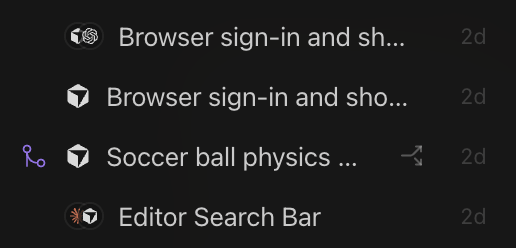
Example: isolate a UI change from an API change
For the parallel search-feature example, create two worktree-backed tasks from the same agreed base commit. One owns the API and the other owns the search UI.
In each task's terminal, check pwd, git status --short, and git branch --show-current. The directories must differ. If a task starts with a detached HEAD, create a named branch before committing work you intend to integrate.
Install dependencies using the repository's instructions in each checkout. If both tasks need a dev server, assign different ports. Keep external service credentials and test data scoped to the intended environment.
After each agent finishes, inspect its changed files and run its focused checks. Commit the intended changes on that task's branch. From a clean integration checkout, merge the reviewed branches one at a time. Resolve conflicts there, then run the combined app and its relevant checks before delivery.
Only clean up the task worktrees after their work is merged or otherwise preserved. The sections below cover base selection, review, and recovery in more detail.
Local checkout or worktree
| Environment | Use it when |
|---|---|
| Local checkout | One task intentionally owns the current working tree and you want changes directly in it |
| Managed worktree | Another task may run concurrently, you need a dedicated branch, or the work should be easy to preserve or discard independently |
A separate conversation is not filesystem isolation. Two tasks using the same local checkout can overwrite files, invalidate tests, and confuse Git state.
Before creating the worktree
Inspect the source checkout:
git status --short
git branch --show-current
git log -1 --oneline
Decide:
- Which repository and checkout are the source
- Which base ref the work should start from
- Whether current local changes must be committed, stashed, or intentionally copied
- Which task owns the resulting branch
- How the branch will be integrated or discarded
Do not start several worktrees from an accidental or poorly understood base state.
How task ownership works
A worktree-backed Synara task owns:
- Its working directory
- Its checked-out branch or detached starting state
- Its provider session
- Its terminal processes
- Its file changes and diff
- Its review and delivery lifecycle
Terminals, file tools, provider operations, and Git actions for that task run inside the task’s environment rather than the primary checkout.
Synara-managed worktrees remain associated with their tasks. Active environments are protected from routine cleanup, while archived environments can be pruned according to Synara’s managed-worktree lifecycle.
Starting from a base ref
Use a base ref that represents the state the task should actually modify:
- Current checkout
HEAD - A local branch or commit
- A pull-request ref supported by the creation workflow
- Another explicit Git revision
When an orchestrating task creates managed worktrees through the Agent Gateway, each worktree starts from the selected base ref. Creation should be treated as one durable operation with a stable request ID.
Working inside the task
Run repository commands from the task’s terminal so they use the correct working directory:
pwd
git status --short
git branch --show-current
git diff --check
Before trusting a test result, confirm that the terminal belongs to the same worktree as the diff you are reviewing.
Avoid editing the same branch from another checkout while the task is active.
Moving work between environments
Use Git history rather than manual file copying.
Common integration paths:
- Merge the worktree branch
- Rebase it onto a newer base
- Cherry-pick reviewed commits
- Open a pull request from the branch
- Recreate a small change manually when the branch contains too much unrelated work
Manual copying loses authorship, branch ancestry, and conflict information. It can also overwrite newer work without Git noticing the intended relationship.
Updating a long-running worktree
When the base branch moves:
- Stop or finish the active provider turn.
- Commit or preserve the worktree’s current state.
- Fetch the latest refs.
- Rebase or merge deliberately.
- Resolve conflicts with one owner.
- Re-run focused and broad verification.
Do not rewrite the branch underneath a running provider session. The provider may continue acting on stale file and commit assumptions.
Reviewing the result
Before integrating:
git status --short
git diff --check
git diff --stat
git log --oneline --decorate --max-count=10
Then inspect the exact range against the intended base:
git diff <base-ref>...HEAD
git log <base-ref>..HEAD --oneline
Confirm that:
- Only intended files changed
- The branch starts from the expected base
- No temporary or generated artifacts remain
- Tests were run from this worktree
- The commits are understandable and independently reviewable
Safe cleanup
Before archiving or removing a worktree-backed task:
- Review changed and untracked files.
- Commit changes you intend to keep.
- Push the branch when it must survive outside the machine.
- Stop terminal processes that depend on the directory.
- Confirm the branch is merged, preserved, or intentionally disposable.
- Archive or remove the task only after that decision is explicit.
Never assume the conversation transcript preserves uncommitted files.
Recovery cases
The worktree contains valuable uncommitted work
Stop cleanup. Inspect git status, create a commit or patch, and push the branch before removing anything.
The branch was deleted remotely
The local worktree and commits may still exist. Inspect local refs and reflogs before creating replacement work.
Tests pass in one checkout but fail in the worktree
Compare environment variables, installed dependencies, generated files, ports, and the exact commit. Passing checks from another checkout do not verify this branch.
Two worktrees now modify the same files
Choose one integration owner. Merge or rebase one branch at a time and resolve conflicts with the full combined behavior in view.
A process keeps the directory busy
Stop development servers, watchers, shells, and provider child processes before cleanup. Do not force-delete an active environment simply to remove a filesystem error.
Worktree checklist
- Source checkout and base ref are understood
- One task owns the worktree and branch
- Concurrent writers use separate worktrees
- Tests run inside the correct environment
- Changes are committed or intentionally discarded
- Important branches are pushed
- Integration is reviewed against the intended base
- No dependent process remains before cleanup
Synara manages the environment, but commits and pushed refs are what make work portable and durable.